If you would rather have this handled for you, our WordPress security service takes care of this end to end. If you could take one simple step that blocks the vast majority of attacks on your WordPress login, would you? That step is two-factor authentication, and it is one of the most effective security measures available to any site owner.
Despite how powerful it is, two-factor authentication is often overlooked. This guide explains what it is, why it matters so much, and how to set it up on WordPress the right way.
What Is Two-Factor Authentication?
Two-factor authentication, often shortened to 2FA, adds a second step to logging in. Instead of relying on a password alone, it requires a second piece of proof that you are who you say you are.
That second factor is usually a temporary code from an app on your phone, though it can also be a hardware key or another method. The key point is that it is something separate from your password.
So even if someone steals or guesses your password, they still cannot log in without that second factor, which they do not have.
Why 2FA Is So Effective
Most attacks on WordPress logins rely on getting hold of a valid password, whether by guessing, brute force, or using credentials leaked from other breaches. Two-factor authentication makes a stolen password almost useless on its own.
- It blocks brute-force attacks that rely on guessing passwords
- It stops credential-stuffing attacks using passwords leaked elsewhere
- It protects accounts even when a password is weak or reused
- It adds a strong barrier with very little day-to-day inconvenience
Two-factor authentication turns a single stolen password from a full compromise into a dead end. Few security measures offer so much protection for so little effort.
Setting Up 2FA on WordPress
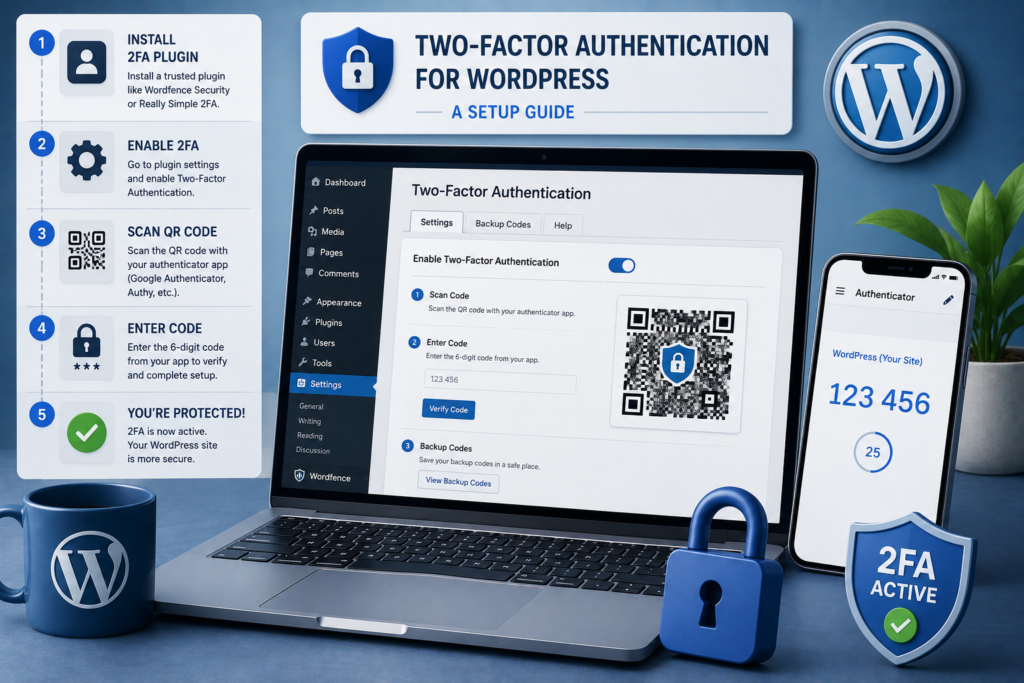
Adding two-factor authentication to WordPress is straightforward, and the payoff is enormous. The general process looks like this.
- Choose a reputable two-factor authentication method or plugin
- Install and enable it on your site
- Link your admin account to an authenticator app on your phone
- Save backup codes somewhere safe in case you lose your device
- Test that logging in with the second factor works as expected
- Roll it out to all other admin and privileged accounts
The whole process takes only a few minutes, and it immediately raises your site’s security.
Best Practices for Two-Factor Authentication
To get the most from 2FA, a few good habits matter. They ensure it protects you without ever locking you out.
Always keep your backup codes in a safe place, separate from your phone, so you can still get in if your device is lost. Enable 2FA on every account with meaningful access, not just your own, since attackers target the weakest account.
An authenticator app is generally more secure than receiving codes by text message, so prefer an app where possible. Combined with strong passwords, this gives your login excellent protection. Our guide on WordPress login security covers the wider picture.
Common Myths About Two-Factor Authentication
A few persistent myths stop people from enabling two-factor authentication, even though it is one of the simplest security wins available. It is worth clearing them up.
Some believe 2FA is only for large businesses or high-value accounts. In truth, automated attacks target sites of every size, and any admin account is worth protecting. Small sites benefit just as much as large ones.
Others worry that 2FA is inconvenient or will slow them down. In practice, it adds only a few seconds at login, and only when logging in, which is a tiny cost for such strong protection.
A final myth is that a strong password alone is enough. Even the strongest password can be exposed in a breach elsewhere and reused against you. Two-factor authentication protects you even when a password has leaked. Once you understand how little it costs and how much it protects, there is very little reason not to turn it on.
Frequently Asked Questions
What is two-factor authentication?
It is a login method that requires two forms of proof: your password plus a second factor, usually a code from a phone app. This makes stolen passwords far less useful to attackers.
Is two-factor authentication difficult to set up?
No. It usually takes just a few minutes with a reputable plugin and an authenticator app. The security benefit is well worth the small effort.
What if I lose my phone with the authenticator app?
Backup codes, saved when you set up 2FA, let you log in if you lose your device. Keep them somewhere safe and separate from your phone.
Should everyone on my site use 2FA?
Yes, especially anyone with admin or privileged access. Attackers target the weakest account, so protecting all of them is important.
For further reading, the official WordPress hardening guide offers helpful, authoritative guidance.
A Small Step With Huge Impact
Two-factor authentication is one of the simplest, most powerful things you can do to secure WordPress. For a few minutes of setup, it blocks the vast majority of login attacks.
BlueBotts sets up and manages strong login security, including two-factor authentication, as part of our maintenance plans. Request a free site audit or get in touch to secure your site.
Get a free audit covering security, updates, backups, and performance gaps. Takes 60 seconds to request and costs nothing.