If you would rather have this handled for you, our WordPress backup service takes care of this end to end. A backup is only useful if it works when you actually need it. Too many site owners discover, at the worst possible moment, that their only backup is corrupt, outdated, or stored on the same server that just failed. The 3-2-1 backup rule exists to prevent exactly that.
This simple, battle-tested strategy is used by IT professionals everywhere, and it applies perfectly to WordPress. In this guide we explain what the 3-2-1 rule is and how to put it into practice so your site is always recoverable.
What Is the 3-2-1 Backup Rule?
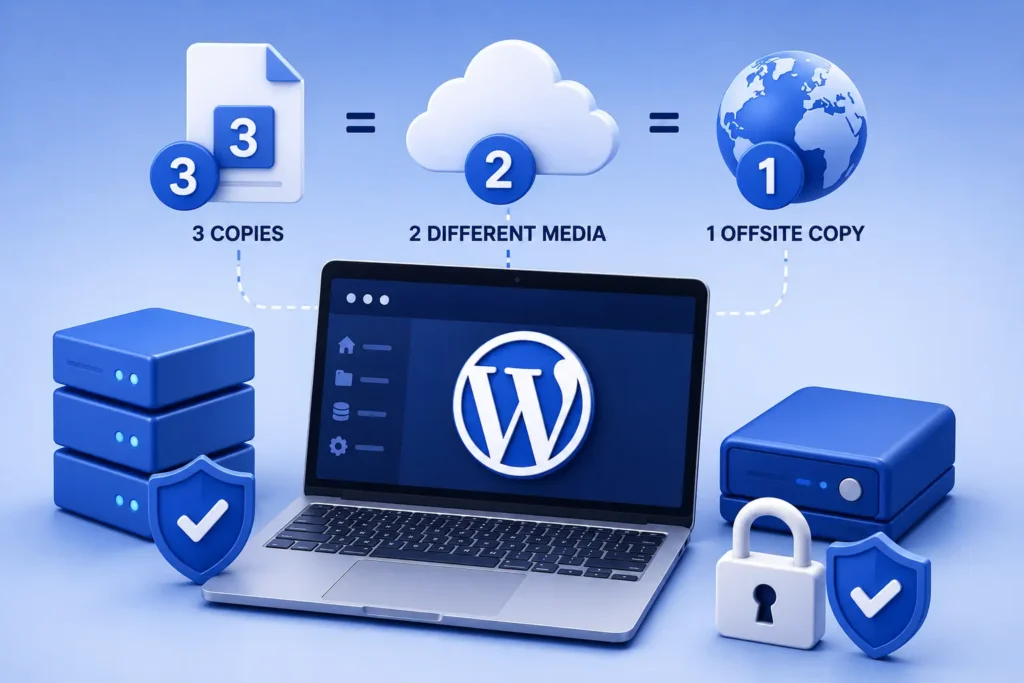
The 3-2-1 rule is a straightforward formula for reliable backups. It means keeping three copies of your data, on two different types of storage, with one copy stored off-site.
Breaking that down:
- Three copies: your live site plus at least two backups
- Two different media: stored in two different places or formats, so one failure cannot destroy both
- One off-site copy: kept somewhere separate from your web server
The logic is simple. If any single point fails, whether it is your server, a storage provider, or a botched update, you still have another copy to fall back on.
Why One Backup Is Never Enough
Relying on a single backup is a common and dangerous mistake. If that backup is stored on the same server as your site, a server failure or a hack can take out both at once.
Backups can also fail silently. A backup process might stop working without any obvious warning, leaving you with files that are weeks out of date or incomplete.
A backup you have never tested is not a backup. It is a hope. The 3-2-1 rule turns that hope into a reliable plan.
Applying the 3-2-1 Rule to WordPress
Putting the rule into practice for WordPress is easier than it sounds. Here is how the pieces fit together.
Copy One: Your Live Site
Your live WordPress site counts as the first copy. It is the working version, but it is also the one most exposed to risk, so it should never be your only copy.
Copy Two: An On-Site or Host Backup
A second copy stored with your host or in a nearby location gives you quick access for everyday restores. This is handy for recovering from a bad update or an accidental change.
Copy Three: An Off-Site Backup
The third copy lives somewhere completely separate, such as a dedicated cloud storage service. If your server is compromised or fails entirely, this off-site copy is your lifeline.
Encryption and Testing Matter Too
Following 3-2-1 is a great start, but two extra details make it truly reliable. First, encrypt your backups so that sensitive data stays protected even if a copy is stolen.
Second, test your restores regularly. Actually restoring a backup to a staging site is the only way to prove it works. Our WordPress backup guide walks through doing this the right way.
How Often Should You Back Up?
The right frequency depends on how often your site changes. A busy store or blog that updates daily needs frequent backups, while a static site can be backed up less often.
- Brochure or rarely updated sites: weekly backups are usually fine
- Active blogs and business sites: daily backups
- Online stores and high-traffic sites: multiple times a day, or real-time
The guiding question is simple: if your site failed right now, how much recent work could you afford to lose? Set your backup frequency to match that answer.
The Peace of Mind a Good Backup Brings
There is a particular kind of stress that comes from knowing your entire business depends on a website you are not sure you could recover. A reliable backup strategy removes that stress completely.
With the 3-2-1 rule in place, almost nothing that happens to your site is a catastrophe. A bad update, a hack, a server failure, or a simple human mistake all become inconveniences rather than disasters, because you can always roll back to a working copy.
That confidence changes how you run your site. You can update, experiment, and make changes without fear, knowing there is always a safety net beneath you. For a business, that freedom to move quickly without risking everything is genuinely valuable.
The best time to sort out your backups is before you need them. Nobody ever regrets having a recent, tested backup ready when something goes wrong.
Frequently Asked Questions
What does the 3-2-1 backup rule mean?
It means keeping three copies of your data, on two different storage types, with one copy stored off-site. This protects you from almost any single point of failure.
Where should I store my off-site WordPress backup?
A reputable cloud storage service, separate from your web host, is ideal. The key is that it is not on the same server as your live site.
How often should I test my backups?
Test a restore at least monthly, and after any major change to your site. A backup you have never restored may not work when you need it most.
Isn’t my host’s backup enough?
Host backups are useful but should not be your only copy. If your hosting account is compromised or the host has an outage, an independent off-site backup keeps you protected.
For further reading, the official WordPress backups documentation offers helpful, authoritative guidance.
Make Your Backups Bulletproof
The 3-2-1 rule is simple, proven, and gives you real peace of mind. With three copies, two storage types, and one off-site backup, your site can survive almost anything.
BlueBotts handles automated, encrypted, off-site backups and regular restore tests as part of our maintenance plans. Request a free site audit or view our plans to make sure your site is always recoverable.
Get a free audit covering security, updates, backups, and performance gaps. Takes 60 seconds to request and costs nothing.