If you would rather have this handled for you, our managed maintenance service takes care of this end to end. Making changes directly on a live WordPress site is a gamble. A single plugin update, theme tweak, or bit of custom code can break your layout or take the whole site offline, in front of your visitors. A WordPress staging site removes that risk entirely.
A staging site is one of the most valuable tools in professional WordPress maintenance, yet many site owners have never used one. This guide explains what a staging site is, why it matters, and how to use it to make changes safely.
What Is a WordPress Staging Site?
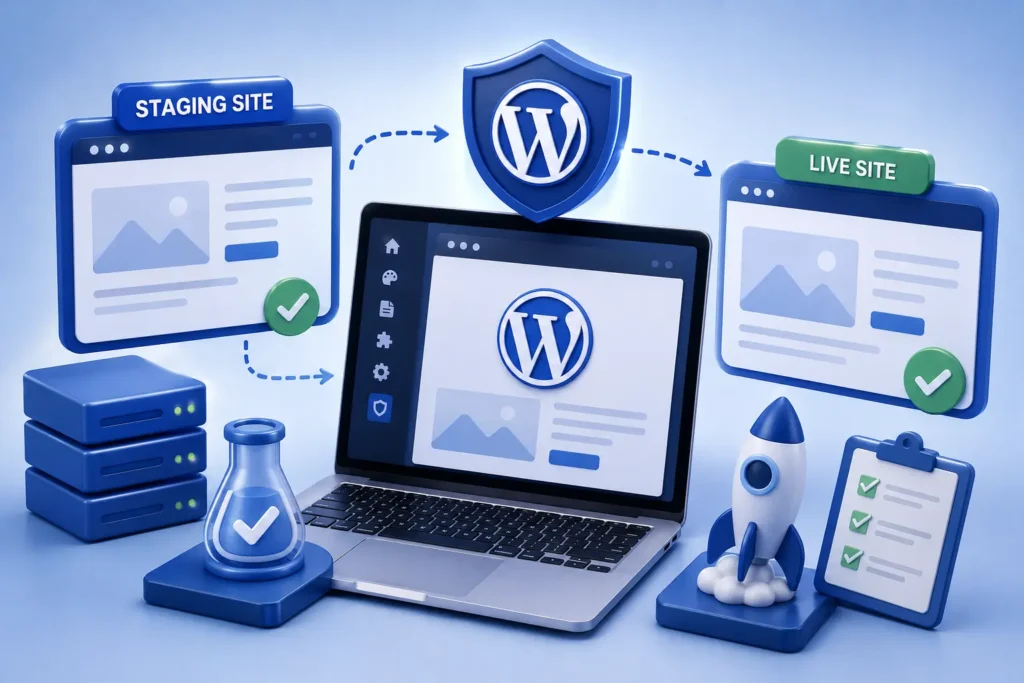
A staging site is a private, working copy of your live website. It looks and behaves exactly like the real thing, but visitors cannot see it and nothing you do there affects your live site.
Think of it as a rehearsal space. You can test updates, try new designs, and experiment freely, knowing that any mistakes stay safely hidden from the public.
Once you have confirmed that everything works on staging, you push the changes to your live site with confidence.
Why You Need a Staging Environment
Testing on staging protects you from the most common cause of self-inflicted downtime: a change that works in theory but breaks in practice.
Safe Updates
Updates are essential for security, but they occasionally conflict with other plugins or your theme. Testing them on staging first means you catch any problems before they ever reach your visitors. Our plugin update strategy guide explains this process in detail.
Risk-Free Experimentation
Want to try a new plugin, redesign a page, or edit custom code? Staging lets you experiment without fear. If something goes wrong, your live site is completely unaffected.
Fewer Emergencies
By catching problems in staging, you avoid the stressful, revenue-losing scramble of fixing a broken live site. Prevention is always cheaper and calmer than emergency repairs.
How a Staging Workflow Works
Using a staging site follows a simple, repeatable pattern. Once you get used to it, it becomes second nature.
- Create a staging copy of your live site
- Make and test your changes on the staging version
- Check that everything works, including forms, checkout, and key pages
- Push the tested changes to your live site
- Verify the live site one more time after deploying
This workflow turns risky changes into routine, predictable updates. It is the same approach professional maintenance teams use every day.
What to Test on Staging
A staging site is only useful if you test thoroughly before going live. Do not just glance at the homepage.
- Confirm all key pages load and look correct
- Test contact forms, search, and any interactive features
- On a store, complete a test checkout end to end
- Check the site on both desktop and mobile
- Watch for layout shifts, broken images, or error messages
The whole point of staging is to find problems before your customers do. A five-minute check can save hours of live cleanup.
Common Staging Mistakes to Avoid
Staging is powerful, but a few mistakes can undermine it. Being aware of them keeps your workflow reliable.
Do not let your staging site drift far out of sync with your live site, or your tests will not reflect reality. Refresh the staging copy before major changes so you are testing against the current version.
Also be careful not to let search engines index your staging site, which can create duplicate content issues. A proper staging setup keeps the copy private and blocked from indexing.
Who Benefits Most From a Staging Site
While every WordPress site benefits from staging, some benefit far more than others. The more your site changes, and the more it matters to your business, the more valuable staging becomes.
Online stores are a clear example. A broken checkout, even for a few minutes, means lost sales and frustrated customers. Testing every change on staging first protects that revenue directly.
Sites with custom code or many plugins also gain a lot, because these are exactly the setups where updates are most likely to cause unexpected conflicts. Staging catches those conflicts privately, before they can cause harm.
Even simple business sites benefit, because a broken homepage or contact form can quietly cost inquiries. In short, if your website plays any real role in your business, staging turns risky guesswork into a safe, controlled process. It is one of the clearest signs of a professionally maintained site.
Frequently Asked Questions
What is a WordPress staging site?
It is a private copy of your live website where you can safely test updates and changes. Nothing you do on staging affects your live site or your visitors.
Do I really need a staging site?
If you ever update plugins, change your design, or edit code, then yes. Staging prevents the most common cause of unexpected downtime and broken pages.
Will a staging site slow down my live site?
No. A properly configured staging site runs separately and does not affect your live site’s speed or performance.
How often should I refresh my staging site?
Refresh it from your live site before any major change, so you are always testing against an accurate, up-to-date copy.
For further reading, the official WordPress documentation offers helpful, authoritative guidance.
Test Safely, Launch Confidently
A staging site is the difference between hoping a change works and knowing it does. It turns risky updates into safe, routine tasks and keeps your live site stable.
BlueBotts uses staging environments as standard when we maintain client sites, so changes are always tested before they go live. Request a free site audit or get in touch to work with a team that protects your site properly.
Get a free audit covering security, updates, backups, and performance gaps. Takes 60 seconds to request and costs nothing.