If you would rather have this handled for you, our WordPress SEO services takes care of this end to end. Broken links and 404 errors are easy to ignore because they rarely cause dramatic problems. But quietly, over time, they frustrate your visitors, waste your crawl budget, and chip away at your search rankings. Left unchecked, they make even a well-designed site feel neglected.
The good news is that broken links are straightforward to find and fix. This guide explains how they hurt your SEO and user experience, and how to clean them up on WordPress.
What Are Broken Links and 404 Errors?
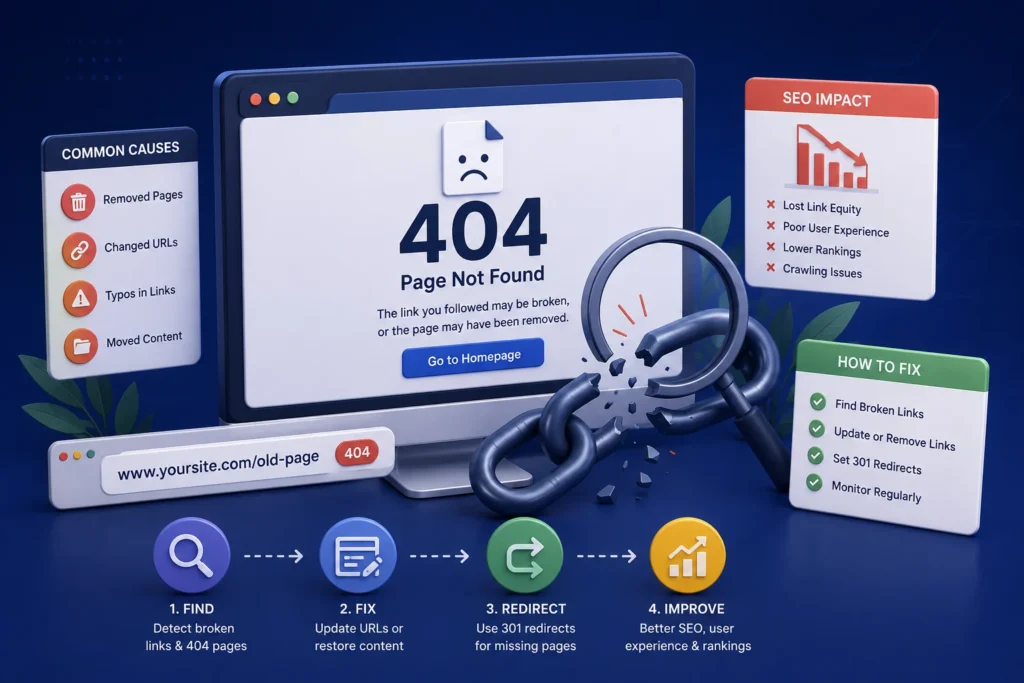
A broken link is a link that points to a page or resource that no longer exists. When someone clicks it, they hit a 404 error, the page that says the content could not be found.
These happen for all sorts of reasons: a page was deleted, a URL was changed, an external site removed content, or a link was simply typed incorrectly.
Every broken link is a small dead end that interrupts a visitor’s journey through your site.
How Broken Links Hurt Your Website
The damage from broken links adds up in several ways, affecting both people and search engines.
Poor User Experience
Nothing frustrates visitors faster than clicking a link and hitting a dead end. Each 404 error is a moment of friction that can send someone away, often for good.
Lost SEO Value
Search engines follow links to discover and rank content. Broken internal links waste that process and can leave valuable pages harder to find. They also signal that a site is poorly maintained.
Wasted Crawl Budget
Search engines allocate limited time to crawling your site. When they spend it hitting dead ends, they have less time to index the pages that actually matter.
A handful of broken links will not sink your rankings overnight, but a site riddled with them looks abandoned to both visitors and search engines.
How to Find Broken Links on WordPress
You cannot fix what you cannot see, so the first step is finding the broken links. Several approaches work well together.
- Use a broken link checking tool to scan your whole site automatically
- Review crawl and coverage reports in your search console
- Watch your analytics for pages generating lots of 404 hits
- Manually check important pages and navigation menus
Regular scanning is key, because new broken links appear over time as content changes and external sites update or disappear.
How to Fix Broken Links Properly
Once you have found them, fixing broken links is usually quick. The right fix depends on the situation.
- For a moved page, set up a redirect from the old URL to the new one
- For a mistyped link, simply correct the URL
- For deleted content, either restore it or redirect to the most relevant page
- For dead external links, update or remove them
- Make sure your 404 page itself is helpful, guiding visitors back to useful content
A well-designed 404 page will not fix the broken link, but it softens the blow by helping lost visitors find their way instead of leaving.
Keeping Your Site Link-Healthy
Broken links are not a one-time fix. They accumulate naturally as your site and the wider web change, so ongoing checks matter.
Building regular link scans into your maintenance routine keeps small problems from piling up. Whenever you delete or move a page, set up the redirect straight away, before the broken link ever has a chance to cause harm.
Why Broken Links Keep Coming Back
Fixing your broken links once feels satisfying, but new ones appear all the time. Understanding why helps you stay on top of them rather than being surprised.
Your own site is one source. Every time you delete a page, change a URL, or restructure your content, you risk leaving behind links that now point nowhere. Without a redirect, those become instant dead ends.
The wider web is another source you cannot control. External sites you link to may move or remove their content, quietly turning your once-valid links into broken ones. You did nothing wrong, but the link still fails.
This is why broken links are best handled with ongoing monitoring rather than occasional clean-ups. Regular scans catch new dead ends early, and setting up redirects as soon as you move or delete a page prevents most internal breakage before it ever affects a visitor.
Frequently Asked Questions
Do broken links hurt SEO?
Yes, indirectly. They waste crawl budget, weaken internal linking, and signal poor maintenance. A site full of broken links is harder for search engines to crawl and rank.
How do I find broken links on my WordPress site?
Use an automated broken link checker, review your search console reports, and watch analytics for pages with frequent 404 errors. Regular scanning catches new issues.
What should I do when I delete a page?
Set up a redirect from the old URL to the most relevant remaining page. This preserves any SEO value and prevents visitors from hitting a dead end.
How often should I check for broken links?
Monthly checks suit most sites, with extra scans after major content changes. Regular monitoring keeps broken links from accumulating.
For further reading, Google Search Central’s guidance on HTTP errors offers helpful, authoritative guidance.
Fix the Dead Ends on Your Site
Broken links and 404 errors are small problems that quietly add up. Finding and fixing them improves user experience, protects your SEO, and keeps your site looking well cared for.
BlueBotts monitors for broken links and manages redirects as part of our maintenance plans. Request a free site audit or get in touch to keep your site healthy and easy to navigate.
Get a free audit covering security, updates, backups, and performance gaps. Takes 60 seconds to request and costs nothing.