If you would rather have this handled for you, our WordPress security service takes care of this end to end. WordPress security in 2026 looks very different from even a year ago. Attackers now use automated bots and AI-assisted tooling to find and exploit vulnerable sites within hours of a flaw being disclosed. If your site runs outdated plugins, weak passwords, or an unpatched theme, it is not a question of if you will be targeted, but when.
This guide breaks down the biggest WordPress security threats of 2026 and the practical steps that actually keep your site safe. Whether you run a small business site or a busy WooCommerce store, these are the priorities that matter most this year.
Why WordPress Is Such a Popular Target
WordPress powers over 40% of all websites, which makes it the single largest attack surface on the web. Hackers do not usually target one specific business. Instead, they scan millions of sites automatically, looking for any known weakness they can exploit at scale.
That popularity is a strength for site owners, because the ecosystem is mature and well-supported. But it also means every new vulnerability is quickly weaponised. The core software itself is remarkably secure. Most successful attacks come through three weak points: plugins, themes, and human error.
The vast majority of hacked WordPress sites were compromised through an outdated plugin or a weak login, not a flaw in WordPress core.
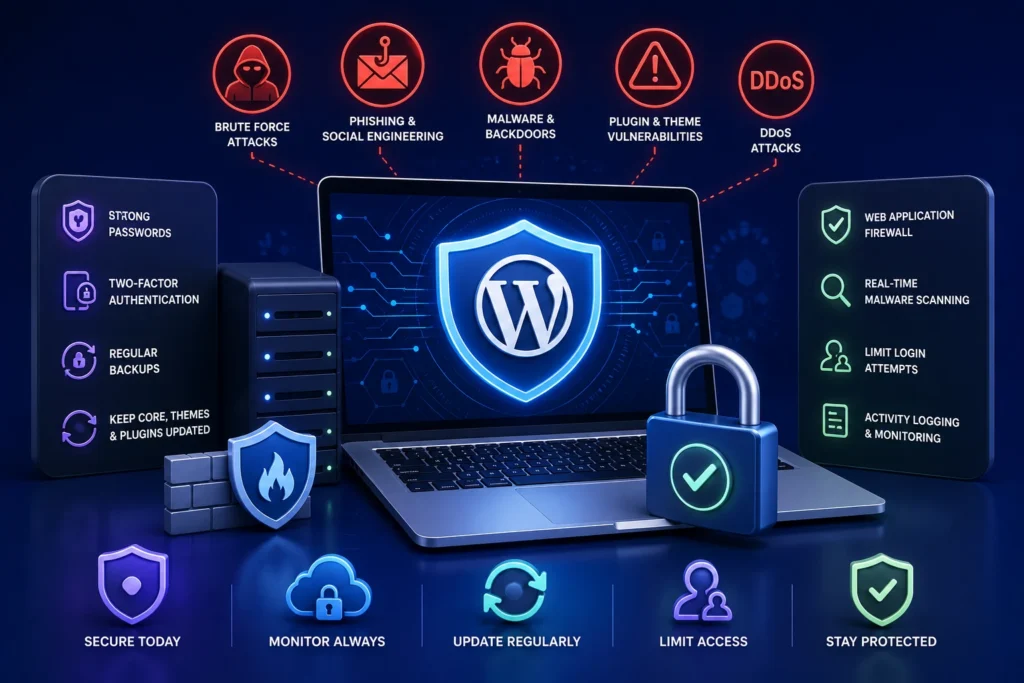
The Biggest WordPress Security Threats in 2026
1. Vulnerable and Abandoned Plugins
Plugins remain the number one entry point for attackers. A single outdated plugin with a known vulnerability can hand a hacker full control of your site.
The risk is even higher with abandoned plugins that no longer receive updates. If a developer stops maintaining a plugin, any newly discovered flaw stays open forever. Auditing your plugins and removing anything unused or unsupported is one of the highest-impact things you can do.
2. AI-Powered Automated Attacks
In 2026, attackers increasingly use automation and machine learning to probe sites faster and adapt to defenses. Bots can now test thousands of login combinations, fingerprint your plugins, and launch tailored attacks with almost no human effort.
The good news is that the same automation can be turned against them. Rate limiting, bot filtering, and a well-configured firewall neutralise the overwhelming majority of these attempts.
3. Brute-Force and Credential-Stuffing Attacks
Weak and reused passwords are still one of the easiest ways in. Attackers take username and password pairs leaked from other breaches and try them against WordPress login pages at scale.
Enforcing strong, unique passwords and two-factor authentication (2FA) shuts this down almost entirely. It is a small change with an enormous security payoff.
4. Supply-Chain and Nulled-Plugin Attacks
“Nulled” or pirated premium plugins are a favourite way to distribute malware. They often look and work exactly like the real thing, while quietly opening a backdoor into your site.
Only ever install plugins and themes from trusted, official sources. A pirated plugin is never worth the risk of a full site compromise.
5. Cross-Site Scripting (XSS) and SQL Injection
These classic web vulnerabilities are still common in poorly coded plugins and custom themes. They let attackers inject malicious scripts or manipulate your database.
Keeping everything updated and using a web application firewall (WAF) blocks most of these attempts before they ever reach your site.
Essential WordPress Security Best Practices for 2026
Strong security is not about one magic plugin. It is a set of layered habits that work together. Here is the checklist we apply to every site we protect.
- Keep WordPress core, plugins, and themes updated promptly, ideally with staging tests first
- Remove every plugin and theme you are not actively using
- Enforce strong passwords and enable two-factor authentication for all admin accounts
- Limit login attempts and hide or protect the wp-admin and wp-login pages
- Install a reputable web application firewall to filter malicious traffic
- Run regular malware scans and act on the results immediately
- Take automated, off-site, encrypted backups and test that they restore
- Use SSL/HTTPS across the entire site and enable security headers such as HSTS
- Give users the lowest level of access they need to do their job
- Monitor uptime and file changes so you spot problems within minutes, not weeks
For a deeper technical walkthrough, see our guide on WordPress security hardening, which covers ten steps that go beyond simply installing a plugin.
Why Updates Are Your First Line of Defense
Most successful attacks exploit vulnerabilities that already have a patch available. In other words, the fix existed, but the site owner had not applied it yet.
Applying updates quickly closes that window. The challenge is that updates can occasionally break a live site, which is why testing on a staging environment first is so important. Our plugin update strategy guide explains how to update safely without taking your site down.
The Role of Backups in a Security Strategy
Even the best-protected site can be compromised. When that happens, a recent, working backup is the difference between a 30-minute recovery and days of lost revenue.
Backups should be automated, stored off-site, encrypted, and tested regularly. A backup you have never restored is only a hope, not a plan. Learn how to do it properly in our WordPress backup guide.
What to Do If Your Site Is Already Hacked
If you notice strange redirects, spam pages, warnings in Google, or a sudden traffic drop, act fast. Every hour a compromise stays live, the damage to your reputation and search rankings grows.
Our step-by-step article on what to do if your WordPress site is hacked walks you through the exact recovery process, from isolating the site to cleaning and hardening it afterwards.
How Ongoing Maintenance Keeps You Secure
Security is not a one-time project. Threats evolve every week, and a site that was secure last month can be vulnerable today. That is why proactive, ongoing maintenance is the most reliable way to stay protected.
A good maintenance service applies updates on a tested schedule, monitors your site around the clock, runs regular scans, and keeps clean backups ready. Instead of reacting to problems after they happen, you prevent most of them entirely.
Common WordPress Security Myths That Leave Sites Exposed
A lot of site owners believe they are safe when they are not. These myths are some of the most dangerous, because they create false confidence.
“My site is too small to be a target”
This is the most common and most costly myth. Attackers rarely target you personally. They run automated scans across millions of sites and attack anything vulnerable, regardless of size. A small site with weak security is an easy win for a bot.
“I have a security plugin, so I am protected”
A security plugin is important, but it is only one layer. Without prompt updates, strong passwords, backups, and a firewall, a single plugin cannot cover every angle. Real security is about layers, not a single install.
“My host takes care of security”
Hosts secure their servers, but the security of your WordPress installation, plugins, themes, and logins is usually your responsibility. Assuming your host has it fully covered leaves large gaps that attackers exploit every day.
Building a Security Routine You Can Sustain
The best security setup is one you can actually keep up with. A perfect plan you abandon after a month is worse than a simple routine you follow every week.
Start small and stay consistent. Schedule a weekly window to review updates, check scan results, and confirm your backups ran. Once that habit is in place, layer in stronger protections over time.
Document who has access to your site and review that list regularly. Old accounts from former staff or freelancers are a frequent, avoidable weak point. Removing access the moment it is no longer needed closes a door attackers love to find open.
Finally, decide in advance what you will do if the worst happens. Knowing exactly who to call and where your backups live turns a panic into a plan.
Frequently Asked Questions
How often should I update WordPress for security?
Apply security updates as soon as they are released, ideally after a quick test on a staging copy. For everything else, a weekly maintenance cycle keeps you well protected without constant disruption.
Do I really need a security plugin and a firewall?
Yes. A security plugin handles scanning, login protection, and hardening, while a web application firewall filters malicious traffic before it reaches your site. Together they cover far more ground than either alone.
Is WordPress secure enough on its own?
WordPress core is very secure. The risk almost always comes from outdated plugins, weak passwords, and misconfiguration. Good habits and ongoing maintenance close those gaps.
Can a hacked WordPress site hurt my Google rankings?
Absolutely. Google may flag or de-index a compromised site, and the resulting traffic and trust loss can take months to recover. Fast detection and cleanup are essential.
For further reading, the official WordPress hardening documentation offers helpful, authoritative guidance.
Protect Your WordPress Site in 2026
The threat landscape keeps evolving, but the fundamentals of good security do not. Keep everything updated, lock down logins, filter traffic, back up reliably, and monitor continuously.
If you would rather have experts handle all of this for you, BlueBotts provides fully managed WordPress security and maintenance. Get a free site audit to see exactly where your site stands, or contact our team to talk through a protection plan that fits your business.
Get a free audit covering security, updates, backups, and performance gaps. Takes 60 seconds to request and costs nothing.